

DJing Discussion
I cannot record my mixes
This area is for discussion about DJing in general. Please remember the community rules when posting and try to be polite and inclusive.
I cannot record my mixes
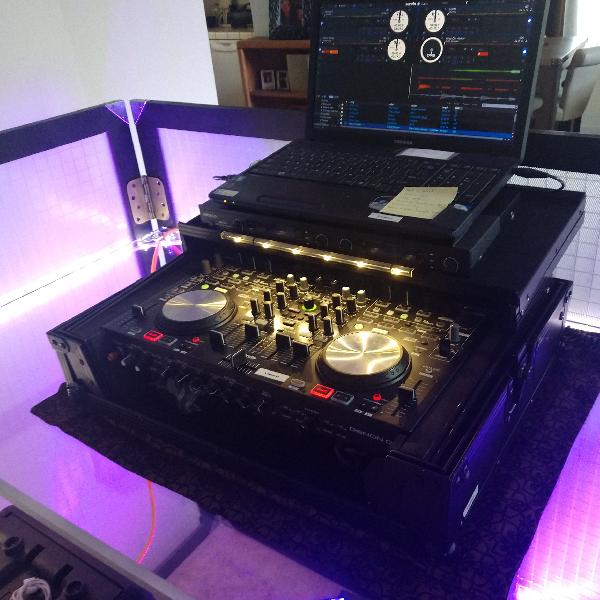
DJ 150
11:18 PM - 3 September, 2012
Every time I record it looks like it is recording but when I click and drag the recorded mix and play it I just get a buzzing noise. I followed the instructions in the guide with no success. Is there something that I need to add to my hardware to make this work? It was suggested that I plug a mini jack into my record out port of my mixer into the microphone port of my laptop but that didn't work either.

sinesthetix
12:30 AM - 4 September, 2012
It seems like you have the cabling sorted. I assume its an RCA to Mini (1/8th inch) out of the record out into the mic in on your laptop.
A couple of things to check.
Is your computer's default record in set to the line in/mic you're using?
Is your recording program set to record from this input?
Post your computer's general specs, what OS you're using, and what software you're recording with and I'll try and be more helpful.
Sounds to me like you're mismatching recording defaults or inputs. Especially if you're using a pc laptop with a built in webcam.
A couple of things to check.
Is your computer's default record in set to the line in/mic you're using?
Is your recording program set to record from this input?
Post your computer's general specs, what OS you're using, and what software you're recording with and I'll try and be more helpful.
Sounds to me like you're mismatching recording defaults or inputs. Especially if you're using a pc laptop with a built in webcam.
DJ 150
1:34 AM - 4 September, 2012
Thanks for the input Sinesthetix... I will take a look at what you are inquiring about and get back to you ASAP...Thanks again.
DJ 150
1:35 AM - 4 September, 2012
and you are correct it is a RCA to Mini (1/8th inch) out of the record out into the mic in on your laptop.
sinesthetix
2:32 AM - 4 September, 2012
ok let me know, i'll be browsing the forums periodically this week. You can pm me if you like but I would post back here in case anyone responds before I check the forums again
DJ 150
2:57 AM - 4 September, 2012
Here is the info on my computer: Toshiba Satellite C655, 4 GB of RAM, 2.10 GHz Pentium Processor, 64 Bit, Windows 7, Service Pack 1. I looked in the default programs and I could not find the recording inputs... for that matter I found nothing associated with recording in the defaults. Here is some history about my laptop...When I purchased it, I had it completely stripped down so that i could only run 2 programs: Serato Live and iTunes. I didn't want anything running or popping up in the background that would cause any latency with the Serato. Do you think that this could be my issue and if so, do you think I can I rebound from it?
sinesthetix
6:21 AM - 4 September, 2012
It depends how stripped down it is. Provided you used the driver set provided by the manufacturer it should be ok. Although tempting to get a clean install by wiping everything and starting from scratch, this isn't necessarily a good idea on a laptop. I would recommend using the recovery suite the laptop comes with and choose the most basic install options.... Next time.
For now, I would recommend you reinstall the sound drivers from the manufacturer website as its possible you are using generic drivers that have a smaller feature set.
Before you do any of that though, right click on the speaker icon in the system tray notification settings and look into the recording options there. The default programs app will not give you what you're looking for.
Let me know how far you get
For now, I would recommend you reinstall the sound drivers from the manufacturer website as its possible you are using generic drivers that have a smaller feature set.
Before you do any of that though, right click on the speaker icon in the system tray notification settings and look into the recording options there. The default programs app will not give you what you're looking for.
Let me know how far you get
DJ 150
4:59 PM - 4 September, 2012
I right clicked on the speaker and clicked on selected recording devices. The only thing listed there is an internal microphone, Conexant SmartAudio HD and I can select the type of microphone that I want it to default to i.e. internal, desktop, or external other...
sinesthetix
6:03 PM - 4 September, 2012
the conexant smartaudio hd is likely the one you're looking for as this is the software that controls your internal sound card. The internal microphone would be part of your integrated webcam.
Choose the conexant device and click on the set as default button. (I'm on a work computer that uses xp or i'd post a screenshot.)
Once that recording device is selected as default, you should be able to record easily into your recording program.
Which recording program will you be using? I use Sony Sound Forge when I record using line-in (not for ssl as i use the sl3)
If you don't have something lined up, grab Audacity. Its free!
audacity.sourceforge.net
Choose the conexant device and click on the set as default button. (I'm on a work computer that uses xp or i'd post a screenshot.)
Once that recording device is selected as default, you should be able to record easily into your recording program.
Which recording program will you be using? I use Sony Sound Forge when I record using line-in (not for ssl as i use the sl3)
If you don't have something lined up, grab Audacity. Its free!
audacity.sourceforge.net
DJ 150
11:05 PM - 4 September, 2012
There is no recording program assigned to my computer so I will try the audacity and let you know how it turns out... Thank you so much for all of your assistance concerning this matter.
DJ 150
12:03 AM - 5 September, 2012
Sooooo... I downloaded audacity and now I am all jacked up! If you haven't figured it out by now, I am an old skool DJ who comes from the era of 2 turntables, a receiver, 2 channel mixer, and some speakers with a million and one crates of records in tow! I am new to going all digital. Anyway audacity is downloaded but it is acting as its own entity. How do you link it to the SL2? I played a tune, audacity recorded it, and when I hit the playback, the music played through my laptops speakers and not my JBL's. I also tried recording directly from the SL2 and it continues to give me the buzzing noise. I was hoping that I could assign audacity as the default recording device but the set default button stays "grayed out" and I cannot select any other options. The external mic continues to be the only device that I can highlight in my recording options because it is still the only device that appears...how can I get the audacity in there or can I? I feel like a snot-nosed rookie in the game!
sinesthetix
4:53 AM - 5 September, 2012
Ok so I downloaded Audacity and made a step 1-4 for you.
Step 1 - choose recording devices
Step 2 - single click conexant and then set default
Step 3 - Choose conexant from the drop down menu in audacity
Step 4 - Play a tune in SSL and click the record button in audacity
This will allow you to record anything that comes out of your laptop speakers. (including movies, websites, etc)
Now that I think about it though, you probably have to choose the headset mic input instead of conexant. Substitute the mic input for conexant and it should work.
Sorry if this is a bit cumbersome, I'm not used to explaining things like this.
Let me know how that goes
Step 1 - choose recording devices
Step 2 - single click conexant and then set default
Step 3 - Choose conexant from the drop down menu in audacity
Step 4 - Play a tune in SSL and click the record button in audacity
This will allow you to record anything that comes out of your laptop speakers. (including movies, websites, etc)
Now that I think about it though, you probably have to choose the headset mic input instead of conexant. Substitute the mic input for conexant and it should work.
Sorry if this is a bit cumbersome, I'm not used to explaining things like this.
Let me know how that goes
DJ 150
12:19 AM - 6 September, 2012
I will give it a whirl and let you know what happens... so if I understand you correctly I should not expect for anything that I play in Serato to record in Serato; I should expect for it to record in audacity? If this is the case, after recording in audacity I should be able to save and transfer the recording to iTunes or Serato...correct?
DJ 150
2:33 AM - 7 September, 2012
My Man... YOU SAVED THE DAY!!! I needed to get this mix recorded for a wedding that I am spinning on Saturday and the Bride was so excited that I was able to record this mix for her wedding party group dance...Thank you for all of your help...The recording sounds a little distorted (loud) any suggestions for tweaking or filtering it? I would imagine that I have to play around with the filter settings in audacity... what's your take?
sinesthetix
3:04 AM - 7 September, 2012
Oh cool!
I'm really glad I was able to help you out, that makes me happy!
As far as levels are concerned, check the levels within Audacity and the output levels on your mixer. If you can use outputs on the mixer that have an independent volume knob, use that first. Unfortunately you can't do much to un-distort a mix that was recorded too loud. Just try out recording a track on its own and adjust audacity and ssl output levels until you're getting it just into the yellow (until you've got a handle on things) and then you can increase volume afterward.
Do you know how to turn down the master output in SSL?
Does the output from the mixer you are using have its own volume knob?
If your mixer has a volume knob for the output you're using, play with that first. If not, use the SSL master volume, just don't forget to turn it back up when you play out.
Super glad I was able to help you, feel free to ask me in this thread if there's anything else related or pm me if there's something else. I know all too well the tribulations of oldschoolers coming into the digital domain like a deer in the headlights. I happened to be a computer geek before I started DJing and remain so, so its something I have a knack for, but there are SHITLOADS of guys out there that see a computer and go "I don't need to check my email, why the fuck do I need this?" and proceed accordingly.
Best of luck at the wedding!
I'm really glad I was able to help you out, that makes me happy!
As far as levels are concerned, check the levels within Audacity and the output levels on your mixer. If you can use outputs on the mixer that have an independent volume knob, use that first. Unfortunately you can't do much to un-distort a mix that was recorded too loud. Just try out recording a track on its own and adjust audacity and ssl output levels until you're getting it just into the yellow (until you've got a handle on things) and then you can increase volume afterward.
Do you know how to turn down the master output in SSL?
Does the output from the mixer you are using have its own volume knob?
If your mixer has a volume knob for the output you're using, play with that first. If not, use the SSL master volume, just don't forget to turn it back up when you play out.
Super glad I was able to help you, feel free to ask me in this thread if there's anything else related or pm me if there's something else. I know all too well the tribulations of oldschoolers coming into the digital domain like a deer in the headlights. I happened to be a computer geek before I started DJing and remain so, so its something I have a knack for, but there are SHITLOADS of guys out there that see a computer and go "I don't need to check my email, why the fuck do I need this?" and proceed accordingly.
Best of luck at the wedding!
DJ 150
8:06 PM - 14 September, 2012
Sorry it took so long to reply. For some reason this email went into my spam folder. Here is an update. I didn't like the original recording so I went back and recorded it a couple of times and it seemed that with each recording the sound quality got better. I just chalked it up to the audacity software being temperamental or audacity not being a quality recording program because it is free. You know how it goes in this business, you will definitely get what you pay for with regards to the quality of your equipment. Whatever the reason the problem corrected itself and I was able to get a good recording so the bride and groom loved the mix. I wish I could say the same thing for their group dance to the mix! LOL I use a Denon 8 channel mixer with all the bells and whistles so I will keep your suggestion on the hip for future recordings. What kind of quality do you get with the Sony Sound Forge software?

DJ Tecniq
9:44 PM - 17 September, 2012
You always wanna sure your levels aren't peaking while recording in the program. In order to successfully get a clean mix you have to check the output levels in your sound preferences on your computer. I usually have this output setting to halfway 50/50. Even if your recording is too low you can still maximize it in audacity for the final process.
Quote:
Sorry it took so long to reply. For some reason this email went into my spam folder. Here is an update. I didn't like the original recording so I went back and recorded it a couple of times and it seemed that with each recording the sound quality got better. I just chalked it up to the audacity software being temperamental or audacity not being a quality recording program because it is free. You know how it goes in this business, you will definitely get what you pay for with regards to the quality of your equipment. Whatever the reason the problem corrected itself and I was able to get a good recording so the bride and groom loved the mix. I wish I could say the same thing for their group dance to the mix! LOL I use a Denon 8 channel mixer with all the bells and whistles so I will keep your suggestion on the hip for future recordings. What kind of quality do you get with the Sony Sound Forge software?
sinesthetix
1:57 AM - 21 September, 2012
Although I haven't experimented with recording in Audacity, mastering your mix after its recorded is what will really improve the sound. Like Tecniq said though, make sure you're not peaking/in the reds. Record low and increase volume later. As you get used to the process you can tweak things how you like. Try using some VST plugins and mess around with those.
web.audacityteam.org
How do you master a mix? Well for that one I am going to leave you to the power of google as it is a long topic.
web.audacityteam.org
How do you master a mix? Well for that one I am going to leave you to the power of google as it is a long topic.
To participate in this forum discussion please log in to your Serato account.