

Software help archive
Serato DJ Stürtzt nach einschalten des TM2 ab
Support
Serato DJ Stürtzt nach einschalten des TM2 ab
A read-only archive of old serato.com help threads.
Serato DJ Stürtzt nach einschalten des TM2 ab
Product
Serato DJ Pro
Version
1.2
Hardware
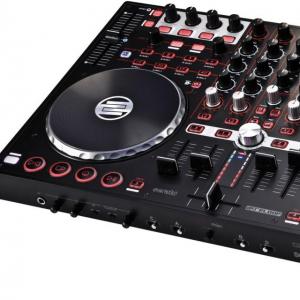
Reloop Terminal Mix 2
Computer
PC
OS
Platform
-

Flippz
2:11 PM - 6 May, 2013
Hallo zusammen.
Ich habe ein großes Problem! Ich habe gestern die aktuelle Serato DJ version 1.2 Installiert. Seit dem Funktioniert gar nichts mehr. Sobald ich meinen Terminal Mix 2 anschließe und einschalte bekomme ich folgende Fehlermeldung:
„Serato DJ funktioniert nicht mehr – Das Programm wird aufgrund eines Problems nicht richtig ausgeführt. Das Programm wird geschlossen und Sie werden benachrichtigt, wenn eine Lösung verfügbar ist.“
Die einzige Auswahlmöglichkeit bei dieser Fehlermeldung ist „Programm schließen“ ich kann leider nirgends erkennen wo das Problem liegt.
Ich hatte früher schon mal so ein ähnliches Problem mit der Serato DJ 1.1.2 Version. Damals kam es auch ab und an zu der beschriebenen Fehlermeldung. Und meistens wenn ich auf den Ping-Pong-Delay geswicht bin kam es zum Absturz wegen eines Problems in der DJFX.dll Datei.
Ich habe Serato DJ komplett deinstalliert und auch meine Registry mit TuneUp auf alte verweise gesäubert.
Ich habe Serato DJ in dem Standartinstallationspfad auf "C:\Program Files (x86)\Serato\SeratoDJ\" Installiert.
Hier noch meine Technischen Daten:
Serato DJ version 1.2
Reloop Terminal Mix 2 – Firmware 0.21
Reloop ASIO Driver version 1.15
Anschluss per USB 2.0 Port
Betriebssystem Microsoft Windows 7 Home Premium - Service Pack 1
Systemtyp: 64 Bit-Betriebssystem
QuadCore Intel Core i7-870, 3200 MHz (24 x 133)
Motherboard Chipsatz: Intel Ibex Peak P55, Intel Lynnfield
Soundkarte: ESI Juli@ Sound Card
Arbeitsspeicher: 12279 MB (DDR3-1333 DDR3 SDRAM)
USB2 Controller: Intel Ibex Peak PCH - USB 2.0 EHCI Controller 1 [B-3]
Ich bin momentan echt Hilflos und hoffe auf eine schnelle Antwort!
Ich habe ein großes Problem! Ich habe gestern die aktuelle Serato DJ version 1.2 Installiert. Seit dem Funktioniert gar nichts mehr. Sobald ich meinen Terminal Mix 2 anschließe und einschalte bekomme ich folgende Fehlermeldung:
„Serato DJ funktioniert nicht mehr – Das Programm wird aufgrund eines Problems nicht richtig ausgeführt. Das Programm wird geschlossen und Sie werden benachrichtigt, wenn eine Lösung verfügbar ist.“
Die einzige Auswahlmöglichkeit bei dieser Fehlermeldung ist „Programm schließen“ ich kann leider nirgends erkennen wo das Problem liegt.
Ich hatte früher schon mal so ein ähnliches Problem mit der Serato DJ 1.1.2 Version. Damals kam es auch ab und an zu der beschriebenen Fehlermeldung. Und meistens wenn ich auf den Ping-Pong-Delay geswicht bin kam es zum Absturz wegen eines Problems in der DJFX.dll Datei.
Ich habe Serato DJ komplett deinstalliert und auch meine Registry mit TuneUp auf alte verweise gesäubert.
Ich habe Serato DJ in dem Standartinstallationspfad auf "C:\Program Files (x86)\Serato\SeratoDJ\" Installiert.
Hier noch meine Technischen Daten:
Serato DJ version 1.2
Reloop Terminal Mix 2 – Firmware 0.21
Reloop ASIO Driver version 1.15
Anschluss per USB 2.0 Port
Betriebssystem Microsoft Windows 7 Home Premium - Service Pack 1
Systemtyp: 64 Bit-Betriebssystem
QuadCore Intel Core i7-870, 3200 MHz (24 x 133)
Motherboard Chipsatz: Intel Ibex Peak P55, Intel Lynnfield
Soundkarte: ESI Juli@ Sound Card
Arbeitsspeicher: 12279 MB (DDR3-1333 DDR3 SDRAM)
USB2 Controller: Intel Ibex Peak PCH - USB 2.0 EHCI Controller 1 [B-3]
Ich bin momentan echt Hilflos und hoffe auf eine schnelle Antwort!

Nils.Liebich@reloop.com
7:23 AM - 7 May, 2013
Hey,
laufen bei Dir Systemprogramme im Hintergrund? Wie z.B. Virenscanner?
laufen bei Dir Systemprogramme im Hintergrund? Wie z.B. Virenscanner?
Flippz
7:49 AM - 7 May, 2013
Hallo,
Ja ich habe einen Virenscanner der läuft eigentlich immer. Das ist der Kaspersky Pure 3
Ja ich habe einen Virenscanner der läuft eigentlich immer. Das ist der Kaspersky Pure 3
Flippz
10:06 AM - 7 May, 2013
Eben lief Serato und Controller, als ich einen Effekt geswicht habe, ist es wieder abgestürtzt.
Ich habe schon die Database V2 Datei von Serato gelöscht und eine kompett neue erstellt, hat leider auch nichts genützt. Kann es sein dass Serato probleme mit zu großen Librarys hat und ich sollte nicht meine ganze Library in Serato importieren?
Ich versuche jetzt mal mit ausgeschaltetem Virenscanner und melde mich dann nochmal :)
Ich habe schon die Database V2 Datei von Serato gelöscht und eine kompett neue erstellt, hat leider auch nichts genützt. Kann es sein dass Serato probleme mit zu großen Librarys hat und ich sollte nicht meine ganze Library in Serato importieren?
Ich versuche jetzt mal mit ausgeschaltetem Virenscanner und melde mich dann nochmal :)


Jamie W
11:29 PM - 12 May, 2013
Hey Flippz,
Vielen Dank für die immer in Kontakt,
Ich bemerkte, Nils von Reloop hat erklärt, das Problem bereits auf den Reloop Foren beantwortet? Ist Ihr Problem jetzt gelöst?
Wenn Sie immer noch Fragen sind Sie in der Lage, um wieder zu mir mit den folgenden Informationen bitte.
1. Sind Sie mit einem beliebigen externen Festplatten?
- Wie groß ist die Festplatte?
- Wie viel Freiraum haben Sie auf ihn haben?
2. Wie groß ist Ihr SERATO DJ-Musik-Bibliothek?
3. Sind Sie mit anderen USB-Geräte?
Thanks :)
Vielen Dank für die immer in Kontakt,
Ich bemerkte, Nils von Reloop hat erklärt, das Problem bereits auf den Reloop Foren beantwortet? Ist Ihr Problem jetzt gelöst?
Wenn Sie immer noch Fragen sind Sie in der Lage, um wieder zu mir mit den folgenden Informationen bitte.
1. Sind Sie mit einem beliebigen externen Festplatten?
- Wie groß ist die Festplatte?
- Wie viel Freiraum haben Sie auf ihn haben?
2. Wie groß ist Ihr SERATO DJ-Musik-Bibliothek?
3. Sind Sie mit anderen USB-Geräte?
Thanks :)
Flippz
9:51 AM - 13 May, 2013
Hello Jamie,
Pleases me that you ask!
Unfortunately, Nils has not helped me so much as I had hoped. Nevertheless, he has given me the determining tip, with the Library size. As a result I have perused many Threads in the Serato forum and have come to this result for the solution.
The problem with the error of Serato DJ is quite good so far. Up to now it is not happened anymore. I have drastically reduced my Serato DJ Bibiliothek at the moment it amounts to approx. 114 KB
I have a 2TB external hard disk who contains my complete music.
Gerätebeschreibung: WDC WD20 EARS-07MVWB0 USB Device
Hersteller: Western Digital
Festplattenfamilie: Caviar Green
Bauform (Form Factor): 3.5"
Kapazität formatiert: 2000 GB
Maximaler interner Datendurchsatz: 880 MBit/s
Schnittstelle: SATA-II
Puffer zu Host Datendurchsatz: 300 MB/s
Puffergröße: 64 MB
Pleases me that you ask!
Unfortunately, Nils has not helped me so much as I had hoped. Nevertheless, he has given me the determining tip, with the Library size. As a result I have perused many Threads in the Serato forum and have come to this result for the solution.
The problem with the error of Serato DJ is quite good so far. Up to now it is not happened anymore. I have drastically reduced my Serato DJ Bibiliothek at the moment it amounts to approx. 114 KB
I have a 2TB external hard disk who contains my complete music.
Gerätebeschreibung: WDC WD20 EARS-07MVWB0 USB Device
Hersteller: Western Digital
Festplattenfamilie: Caviar Green
Bauform (Form Factor): 3.5"
Kapazität formatiert: 2000 GB
Maximaler interner Datendurchsatz: 880 MBit/s
Schnittstelle: SATA-II
Puffer zu Host Datendurchsatz: 300 MB/s
Puffergröße: 64 MB
Flippz
9:57 AM - 13 May, 2013
Sorry, I have forgotten the USB devices.
I have already connected some devices via USB on my PC.
1. Akai MPD26
2. Logitech Whireless Mouse
3. Saitek keyboard USB
4. Hard disk WD20EARS
I have already connected some devices via USB on my PC.
1. Akai MPD26
2. Logitech Whireless Mouse
3. Saitek keyboard USB
4. Hard disk WD20EARS
Jamie W
3:11 AM - 15 May, 2013
Hey Flippz,
Thanks for that information,
Nice work resolving your issue :)
Serato applications run off a 32bit platform. This means they can only utilise a certain amount of your computers RAM / Virtual memory space (regardless of how much ram you may have installed).
This is a massive library of music, and I think this is whats caused you issues.
-- Your best option is to run a smaller Serato DJ library like Nils has recommend.
We are working hard on library management and I am confident this will only improve over time. But for now you will need to cut your library size down.
Regarding the USB devices.
-- Do you use a POWERED USB hub?
This is extremely important since you are running 4 devices.
Can you explain to me how everything is connected to your PC?
Thanks.
Thanks for that information,
Quote:
The problem with the error of Serato DJ is quite good so far. Up to now it is not happened anymore. I have drastically reduced my Serato DJ Bibiliothek at the moment it amounts to approx. 114 KBNice work resolving your issue :)
Serato applications run off a 32bit platform. This means they can only utilise a certain amount of your computers RAM / Virtual memory space (regardless of how much ram you may have installed).
Quote:
I have a 2TB external hard disk who contains my complete music.This is a massive library of music, and I think this is whats caused you issues.
-- Your best option is to run a smaller Serato DJ library like Nils has recommend.
We are working hard on library management and I am confident this will only improve over time. But for now you will need to cut your library size down.
Regarding the USB devices.
-- Do you use a POWERED USB hub?
This is extremely important since you are running 4 devices.
Can you explain to me how everything is connected to your PC?
Thanks.
Flippz
5:32 PM - 15 May, 2013
But for now you will need to cut your library size down.
This pleases me to hear really! =D as an interim solution I can already live with a diminished Library, but a bigger one would be very desirable for the future
-- Do you use a POWERED USB hub?
This is extremely important since you are running 4 devices.
Can you explain to me how everything is connected to your PC?
Yes I have an USB-Hub with external electricity supply
Nevertheless, on the USB-Hub hangs merely my MPD26
All the other USB devices are linked directly with the PC
kind regards
Quote:
We are working hard on library management and I am confident this will only improve over time.But for now you will need to cut your library size down.
This pleases me to hear really! =D as an interim solution I can already live with a diminished Library, but a bigger one would be very desirable for the future
Quote:
Regarding the USB devices.-- Do you use a POWERED USB hub?
This is extremely important since you are running 4 devices.
Can you explain to me how everything is connected to your PC?
Yes I have an USB-Hub with external electricity supply
Nevertheless, on the USB-Hub hangs merely my MPD26
All the other USB devices are linked directly with the PC
kind regards
Jamie W
10:04 PM - 16 May, 2013
Hey Flippz,
Thanks for that information,
I noticed you use a USB hub for only one device?
-- I would advise you connect that device directly to your computer if you have a spare USB port available for it.
If you ever have any other questions please feel free to ask :)
Thanks.
Thanks for that information,
I noticed you use a USB hub for only one device?
-- I would advise you connect that device directly to your computer if you have a spare USB port available for it.
If you ever have any other questions please feel free to ask :)
Thanks.
Flippz
4:16 PM - 21 November, 2013
Hello,
Up to now Serato DJ has not crashed any more, however, now, unfortunately, I have another problem.
My TM2 freez itself after some time. However, Serato DJ further runs without problems. The music is played and by mouse the software can be served furthermore. If I switch off the TM2 and again Switching on everything can be controlled again by the controller. However, this problem appears over and over again. After a few minutes sometimes due longer time.
I have deactivated in the energy options already the "selective USB energy saving. The TM2 is connected in an active USB2.0 HUB, my external hard disk witch contains the music hangs also on this HUB. Mouse and Keyboard are in the same USB-HUB.
No other programms run in the background, no virus scanner or other. WLAN is a deactivated and there is as for the rest no connection with the Internet.
If I have during the next days, I try sometimes to leave out from the external HDD and to work only about the internal. Should it not work so, I am slowly real in despairing. Thus gives really no pleasure :(
kind regards
Up to now Serato DJ has not crashed any more, however, now, unfortunately, I have another problem.
My TM2 freez itself after some time. However, Serato DJ further runs without problems. The music is played and by mouse the software can be served furthermore. If I switch off the TM2 and again Switching on everything can be controlled again by the controller. However, this problem appears over and over again. After a few minutes sometimes due longer time.
I have deactivated in the energy options already the "selective USB energy saving. The TM2 is connected in an active USB2.0 HUB, my external hard disk witch contains the music hangs also on this HUB. Mouse and Keyboard are in the same USB-HUB.
No other programms run in the background, no virus scanner or other. WLAN is a deactivated and there is as for the rest no connection with the Internet.
If I have during the next days, I try sometimes to leave out from the external HDD and to work only about the internal. Should it not work so, I am slowly real in despairing. Thus gives really no pleasure :(
kind regards
Flippz
4:18 PM - 21 November, 2013
Product: Serato DJ
Version: 1.5.2
Hardware: Reloop Terminal Mix 2
Computer: PC
OS: Windows 7 (64 bit) Service Pack 1
Version: 1.5.2
Hardware: Reloop Terminal Mix 2
Computer: PC
OS: Windows 7 (64 bit) Service Pack 1

Karl Y
3:05 PM - 25 November, 2013
Hallo Flippz
Wenn du anstatt den TM-2 aus- und wieder anzuschalten stattdessen Serato DJ neu startest, geht es dann auch wieder? Das wäre ein interessanter erster Test um heraus zu finden ob es am Gerät oder an der Software / einer Einstellung deines Betriebssystems liegt.
Viele Grüße
Karl
Wenn du anstatt den TM-2 aus- und wieder anzuschalten stattdessen Serato DJ neu startest, geht es dann auch wieder? Das wäre ein interessanter erster Test um heraus zu finden ob es am Gerät oder an der Software / einer Einstellung deines Betriebssystems liegt.
Viele Grüße
Karl